Epic Games 启动器预览版登陆 Windows、macOS 与 Linux
Epic Games Launcher Preview Launches on Windows, Mac and Linux
Epic Games 发布重新设计的 Epic Games 启动器预览版,现已登陆 Windows、macOS 与 Linux。新启动器带来界面与库管理改进并减少资源占用,但初始功能少于现行版本且 Fortnite 暂未支持 Linux。玩家可登录原有账号继承游戏与云存档,官方建议竞技玩家在预览期继续使用当前启动器。
同一新闻,精选展示《Epic Games Launcher 预览版发布:原生 Linux 支持、Fortnite 将登陆 Linux 且升级 Easy Anti-Cheat》
Epic Games has launched a Preview version of its redesigned Epic Games Launcher, promising faster performance, smoother navigation and an improved library experience. Available now on Windows, macOS and Linux, the new launcher introduces a range of interface and usability changes, although Epic warns that the initial release has fewer features than the current version.
The redesigned launcher aims to reduce loading times, improve navigation between the library and store, and use fewer system resources while running in the background. It also includes a shopping cart and support for voice chat and parties across Fortnite, the Epic Games Store and the Epic Games app.
The library has received several improvements, with individual game pages displaying their status, activity, details and available play controls. Players can also connect their PC game libraries to bring their owned titles together in one place.
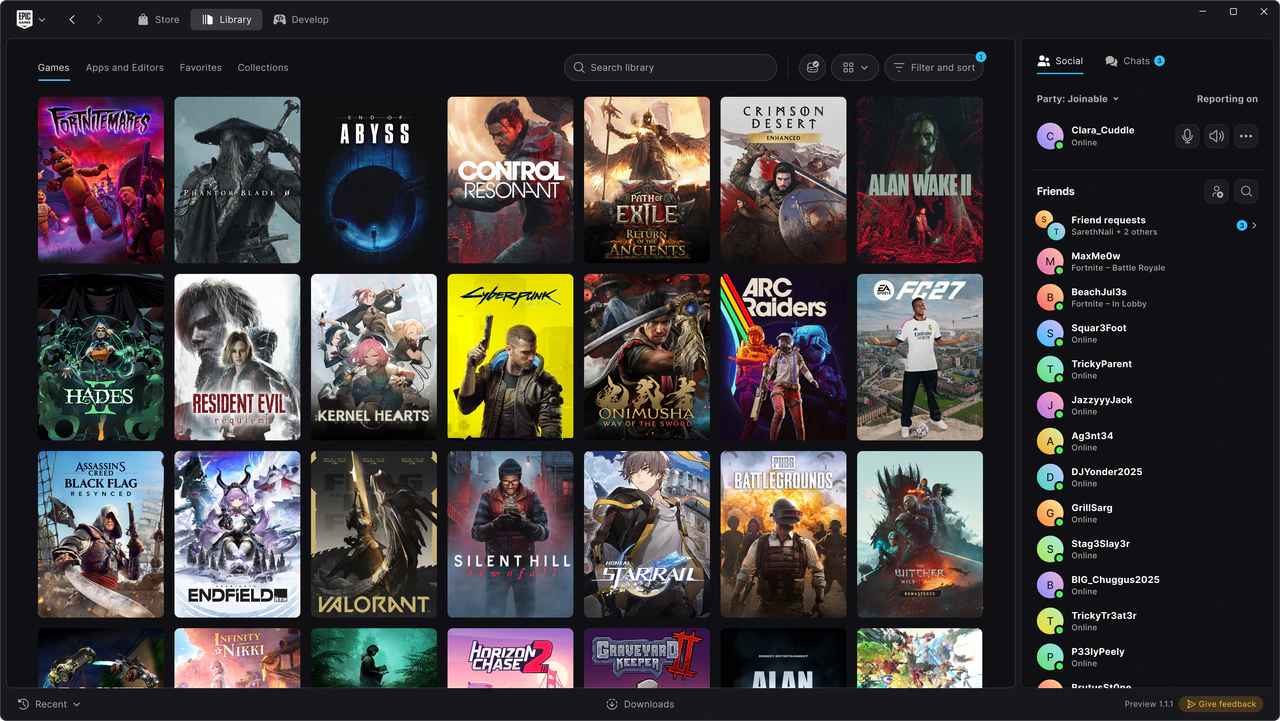
Users can organise their collections, switch between grid and list views, and customise the top bar with their favourite games and applications. Search and filtering options are designed to make large libraries easier to navigate, while the updated download manager displays download, read and write speeds alongside active, queued, scheduled and failed downloads.
Linux support is another significant addition, marking the first time the Epic Games Launcher has been made available on the platform. However, Fortnite is not yet supported on Linux through the launcher.
Epic says it is working to bring Fortnite to Linux by rebuilding its Easy Anti-Cheat technology and collaborating with Linux distribution maintainers on security requirements. The company plans to introduce the game once support is established across a sufficient number of distributions. Epic also intends to make these improvements available to other developers so they can bring their games to Linux.
Players can download the Preview from the official Epic Games Launcher website. After installing the software, users can sign in with their existing Epic Games accounts. Purchased and installed games, cloud saves and progress remain linked to the account and will carry over to the Preview and the full release.
Epic is encouraging players to use the in-launcher feedback option to report issues as development continues. However, the company recommends that competitive players and developers working on live projects stick with the current launcher during the Preview period.
The Preview will receive further updates, performance improvements and new features as Epic gathers feedback ahead of the redesigned launcher’s full release.
The post Epic Games Launcher Preview Launches on Windows, Mac and Linux appeared first on TwistedVoxel.
来源:TwistedVoxel · twistedvoxel.com