Final Fantasy Resonance 最佳便携版对比:Switch 2、Steam Deck、ROG Ally 等实测
Which is the best portable version of Final Fantasy Resonance? We compare Switch 2, Steam Deck, and more
Final Fantasy Resonance 的 Steam 版在 ROG Ally 掌机上获得最佳便携画面与性能,Steam Deck OLED 次之,Switch 2 原生版加载快但采用子原生分辨率与较低画质。
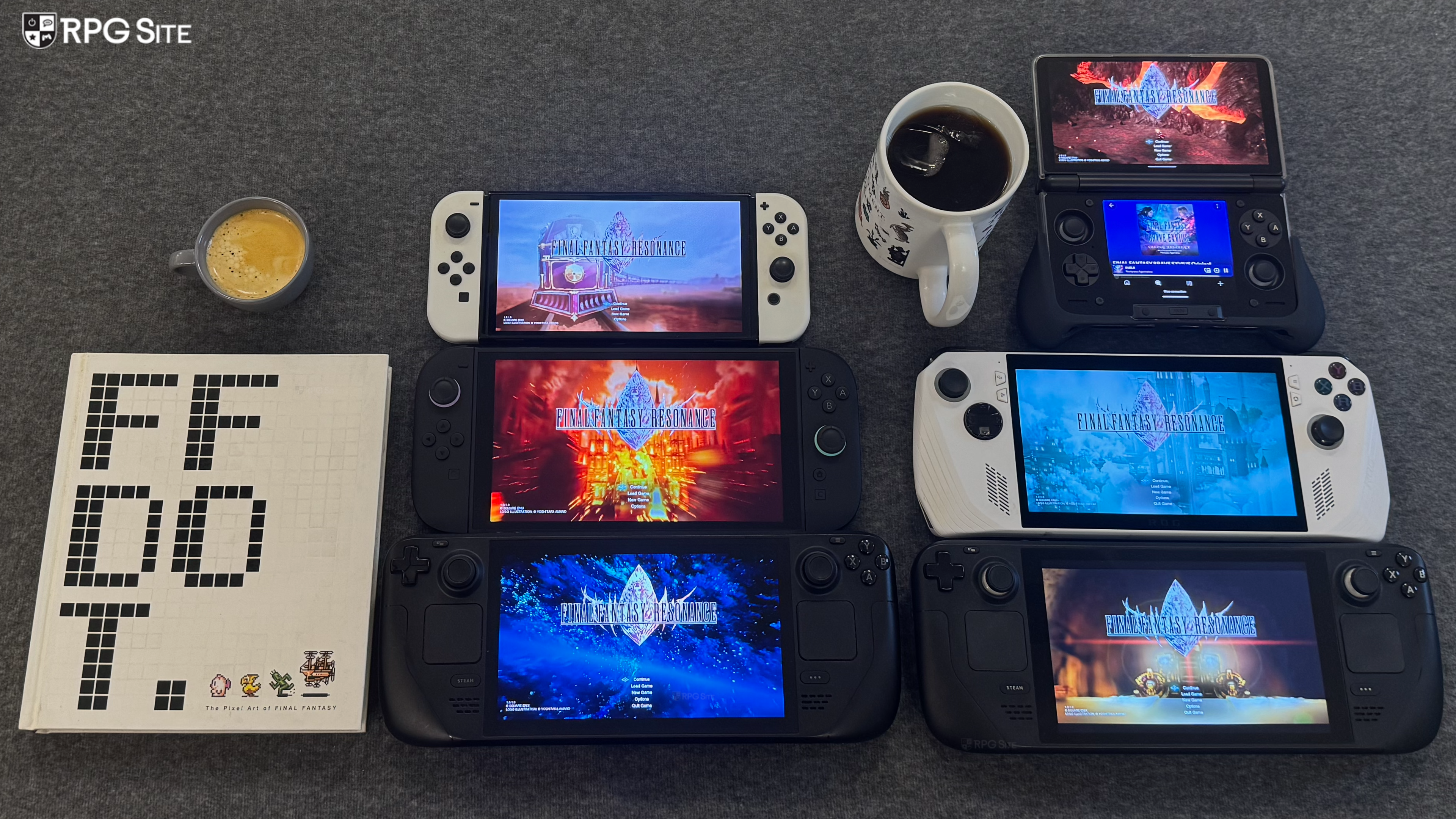
Final Fantasy Resonance launches this week for Switch 1, Switch 2, PS5, Xbox, and Steam worldwide as the first HD-2D Final Fantasy game. Ahead of its launch, I've had a chance to play the Switch, Switch 2, and Steam versions of the full game across multiple handhelds. When I did my demo comparison, it was great to see how Square Enix scaled it across different platforms, but I've decided to focus purely on the portable experience for this week's comparison as I've been enjoying it quite a lot as a portable game. For this article, I tested the Switch 1 version, Switch 1 version on Switch 2, Switch 2 version, and also the Steam version across two Steam Decks (OLED/LCD), ROG Ally, and AYN Thor with GameNative.
Final Fantasy Resonance PC full game graphics and display options
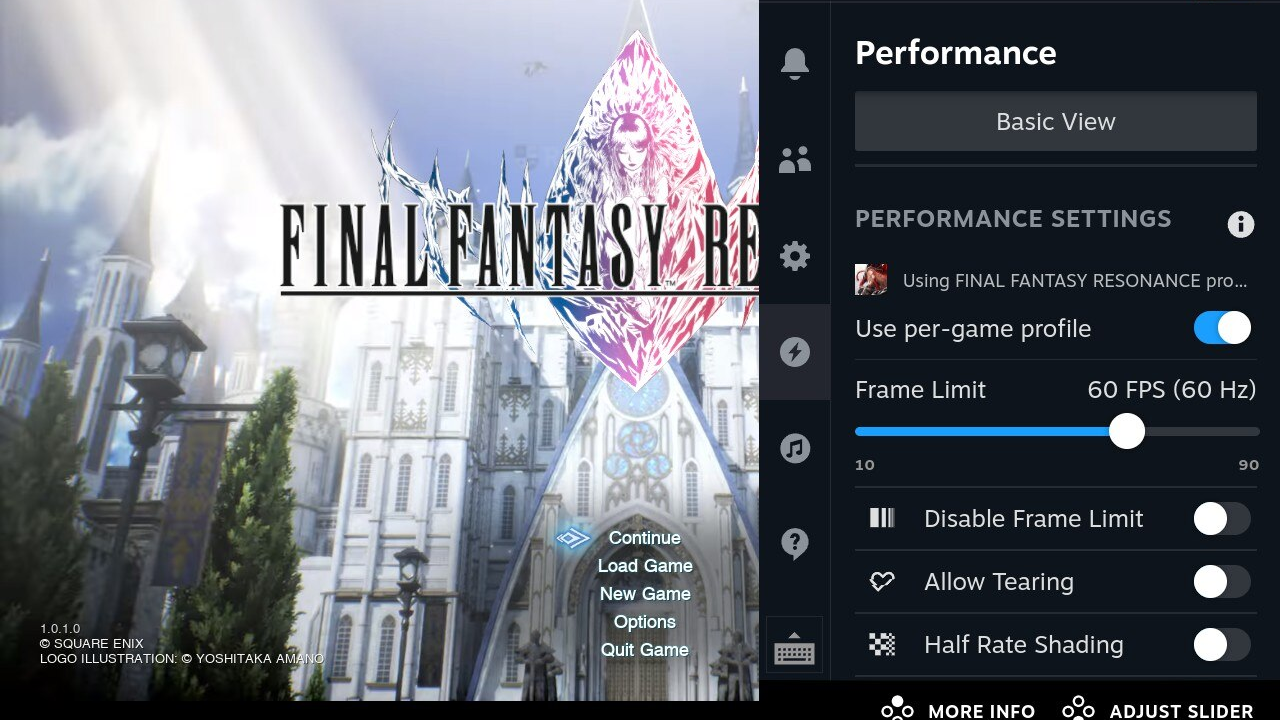
Final Fantasy Resonance's full game supports 720p to 4K resolutions on PC. As for the graphics options, you can adjust window mode (fullscreen, borderless, windowed), frame rate cap (30, 60, 120, 144, and unlimited), toggle v-sync, and then adjust the following settings across low, middle, high, and max: textures, post-processing, anti-aliasing, and shadows.
Final Fantasy Resonance Steam Deck recommended settings for the full game
Final Fantasy Resonance defaults to 720p and high settings on Steam Deck. With this, it is basically perfect on Steam Deck LCD, but you will need to cap the OLED model screen to 60hz because Final Fantasy Resonance can't hit 90fps consistently on Steam Deck. I also noticed some small dips below 60fps in parts. The fix for this is turning the shadow setting to middle from high. Barring that, there is nothing to change. It looks and runs brilliantly. Like other HD-2D games, the OLED screen here really elevates the experience if you have that model.
Final Fantasy Resonance Switch 1 vs Switch 2 final build compared
Since Final Fantasy Resonance is getting a proper physical release on Switch 1 and is a Game-Key Card on Switch 2, I know many are curious about playing the Switch 1 version on Switch 2. While I could recommend it for Tales of Eternia Remastered when it comes to portable play, I can't do that for Final Fantasy Resonance. The Switch 2 version is just a lot better across the board.
Just like the demo, the Switch 1 version of Final Fantasy Resonance is capped at 30fps when played on Switch 2. The Switch 2 version targets 60fps and is higher resolution. It also has faster loading in-game. Every screen transition between areas takes almost twice the amount of time on Switch 1 as Switch 2 even played on Switch 2. This is one of the rare Square Enix Switch 2 releases where there are no major caveats to the port quality. It isn't an amazing port, but it is better than what I'm used to from Square Enix. The only issue I have with it is texture filtering where the floor textures can look quite blurry. Beyond that, there is nothing I dislike about the Switch 2 port and it is a very good portable version.
Final Fantasy Resonance Switch 1 handheld boost mode on Switch 2
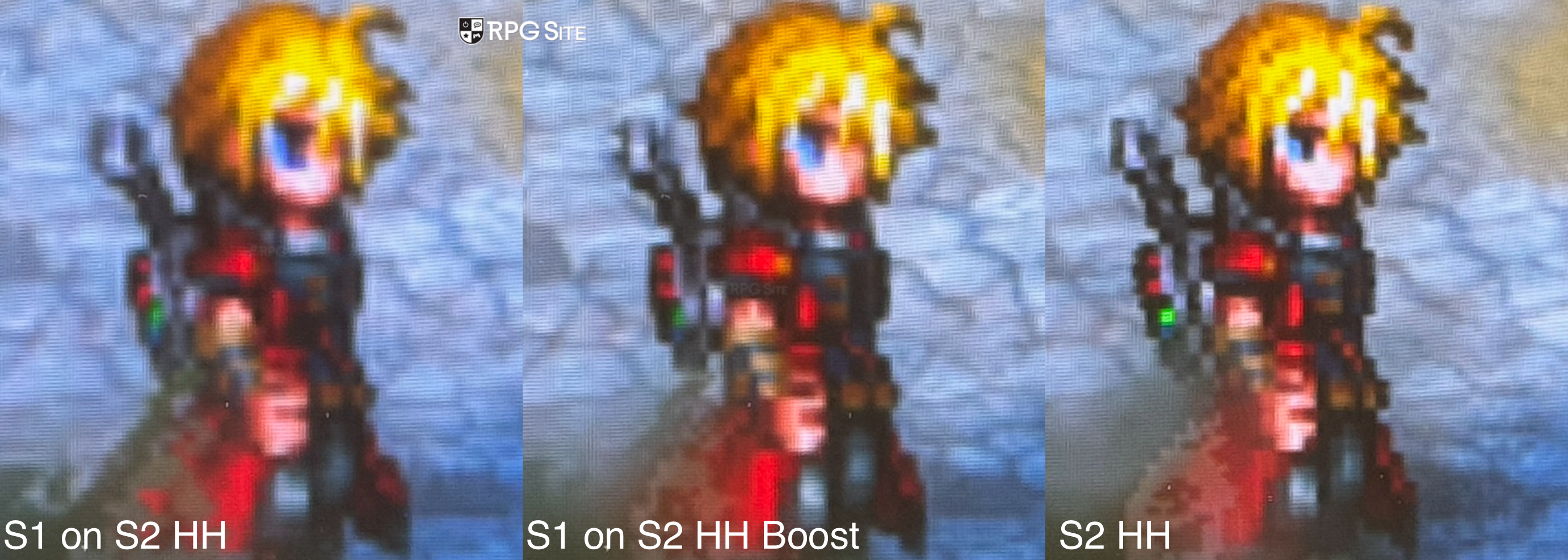
As for handheld boost mode, things are the same as the demo build. The Switch 2 native release handheld is still better than Switch 1 played via handheld boost mode. I've included a comparison showing how Final Fantasy Resonance looks played on Switch 2 via handheld boost mode compared with the native Switch 2 release.
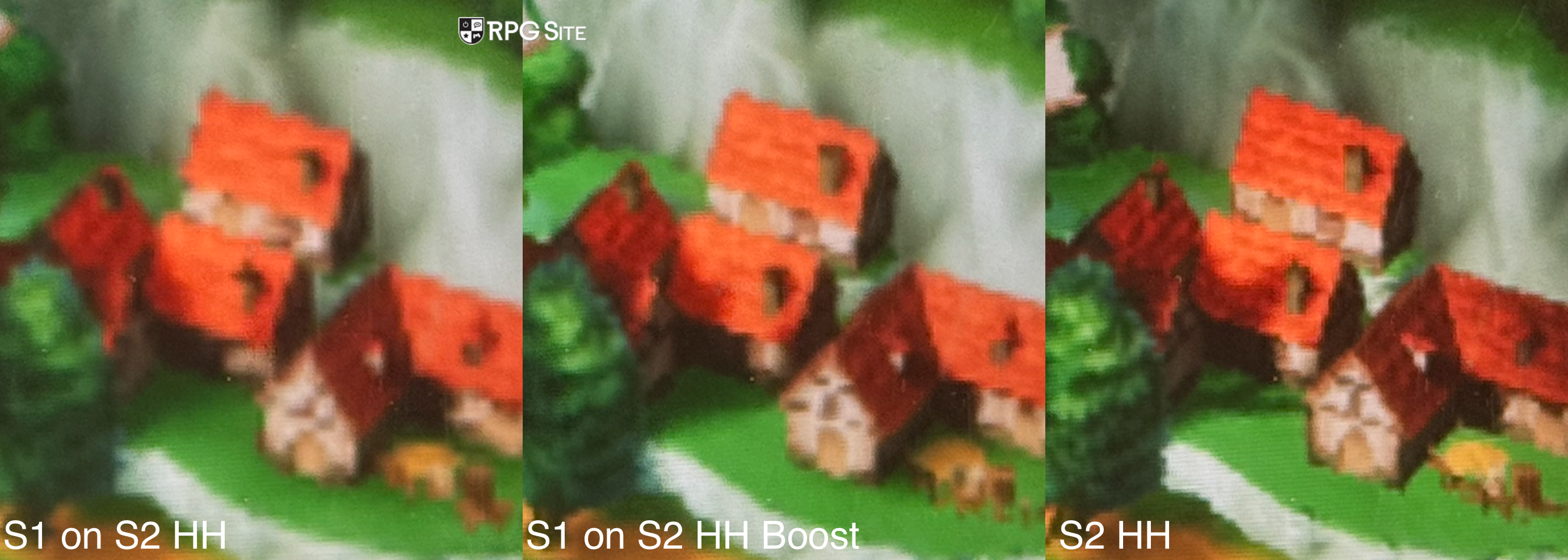
Note: For the handheld boost mode comparisons, I used the Switch 2 accessibility zoom options and tested the Switch 1 version with and without boost mode. I also tested the Switch 2 version on Switch 2 and cropped the photos to show how the game looks across configurations.
Final Fantasy Resonance AYN Thor full game settings so far
I don't recommend playing Final Fantasy Resonance on AYN Thor through GameNative right now. I'm sure there will be community fixes in the coming days, but right now it is unstable and takes too long to load. While in-game, it crashes randomly after some time as well. When it wasn't crashing, it appeared to deliver a solid 720p experience. I will add more details once the crashing is resolved or better GameNative settings are known.
Final Fantasy Resonance full game visuals across Switch 2, Steam Deck, Switch 1, ROG Ally, and AYN Thor
Out of the handhelds I own, Final Fantasy Resonance is best on ROG Ally since it delivers a 1080p experience with the graphics at high. The Deck is below with the same settings more or less, but at 720p. This is a proper match for the handheld's screen. The Switch 2 is similar to Steam Deck resolution wise, but since the display on the device is 1080p, you are only getting a 1080p UI with subnative gameplay. The Switch 2 version also uses lower settings which aren't a huge issue, but you can immediately notice the floor or ground textures looking blurry compared to the PC version on handhelds. I think Square Enix could've done better given what the Switch 2 is capable of. The Switch 1 version on the other hand is quite good for the hardware, but it is easily the worst version.
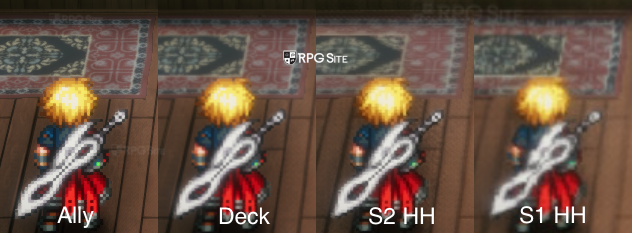
Final Fantasy Resonance full game performance across Switch 2, Steam Deck, Switch 1, ROG Ally, and AYN Thor
Moving over to performance, Final Fantasy Resonance on Steam Deck on the high preset, like the demo, almost always runs above 60fps, but it drops below into the 50s during heavy particle effects when you cast spells. I didn't notice major drops in actual gameplay when you move your character though, but I recommend turning shadows to middle from the high setting. If you play with the maximum settings, expect a 40fps experience. To get a locked 60fps experience, you should play with a mix of middle (shadows) and high settings, but it still looks better than the Switch 1/2 versions. If you want the best possible visuals for portable play on Steam Deck, I recommend playing at 40fps on LCD or 45 on OLED with some tweaks to the shadow setting right now, but you really should stick to the 60fps settings. When playing on the ROG Ally, the VRR screen helps sort out any dips when playing at 1080p and it looks crisp across the board.
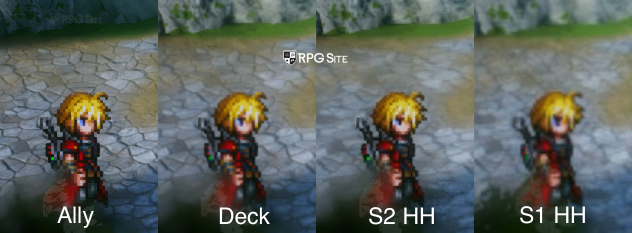
The Switch 1 version on Switch 1 holds up quite well, but it is a big step down from the great Switch 2 native release. Final Fantasy Resonance was clearly targeting Switch 1 as its base platform and then scaled up, and you can see this when playing them side by side. The Switch 1 version isn't bad by any means, but it is a notable step down from how good the Switch 2 version feels handheld. I just wish we had a quality/performance mode option on Switch 2.
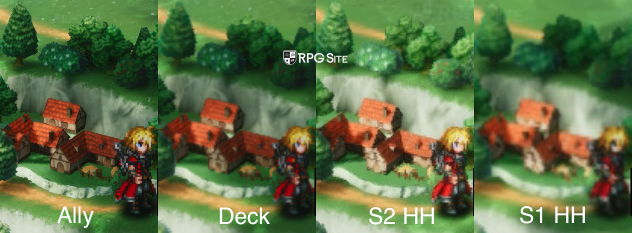
Final Fantasy Resonance load times on Switch 2, Steam Deck, ROG Ally, Switch, and AYN Thor
To test load times, I installed Final Fantasy Resonance on Steam Deck internal storage, ROG Ally internal storage, AYN Thor internal storage, the Switch 1 and Switch 2 versions on the Switch 2 internal storage, and the Switch version on my Switch OLED SD card. I measured the time taken to load the title screen from the dashboard and the time taken to load an early game save. The results below are in seconds.
| Platform | Dashboard to title screen | Loading a save |
| Switch 1 | 26 | 5 |
| Switch 2 | 11 | 3-4 |
| Switch 1 on Switch 2 | 10-11 | 4 |
| Steam Deck | 22 | 2-3 |
| ROG Ally | 12-13 | 2-3 |
| AYN Thor | 45-48 | 7-8 |
As you can see, the Switch 2 and Switch 1 on Switch 2 deliver the fastest initial load. While in-game, the PC version on Steam Deck and ROG Ally SSD is faster. The Switch 1 version takes long initially, but is quite fast all things considered while in-game. The game on AYN Thor is currently too unstable to recommend even if you are ok with the longer load times.
Which is the best portable version of Final Fantasy Resonance?
In the case of Final Fantasy Resonance there is no bad version, but I feel like Square Enix could've done a bit more with the Switch 2 native release. Thankfully it isn't as inconsistent as Octopath Traveler 0 was on Switch 2. If you want the best possible visuals and performance on the go, the Steam version on ROG Ally is the one you should get. The second best is the Steam Deck OLED because the screen really elevates the experience and you get a native 720p resolution match for the display. The Steam version holds up perfectly on Steam Deck LCD and OLED, but the OLED screen makes that my favorite version after the ROG Ally.
The Switch 2 version runs well and loads fast, but it is a bit disappointing to see Square Enix use lower settings and a sub-native resolution for gameplay with native resolution for UI when the device is clearly capable of more based on other games from the same publisher. This is a portable-focused article, but if you value playing at home on TV/docked as well, I would go with Switch 2 over Steam Deck and ROG Ally since you get a solid hybrid release. As usual, I will update this if patches change any of the visual or performance profiles. I will also retest it on AYN Thor once there are some community configurations addressing the current issues.
I also hope Square Enix adds some post-processing options so we can disable some of the heavier effects during gameplay. It would also be nice to see a quality mode option on Switch 2 targeting 40fps or even 30fps in the future for those who prefer crisp visuals rather than a 60fps experience with softer visuals.
来源:RPG Site · rpgsite.net